March 2025
Did you know?
You can easily change the project enrollment for a client.
Did you use the ADMIN project by mistake? Did your finger slip and the wrong drop-down choice was picked? Not a problem!
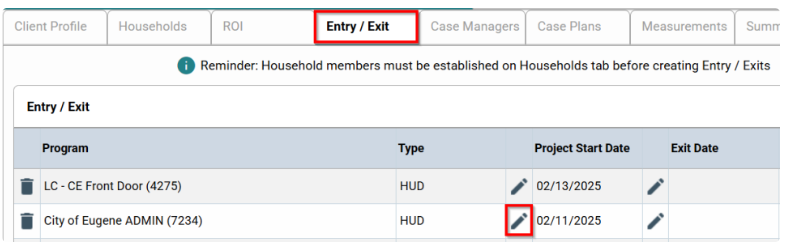
1) Starting on the Client Profile, click on the Entry/Exit tab, then the pencil icon for the project you want to change.
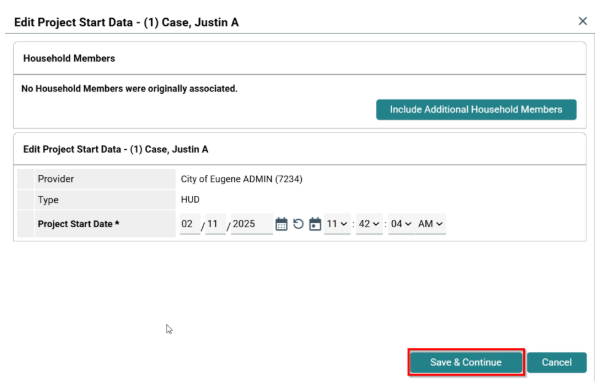
2) On the dialog box that pops up, click on Save & Continue.
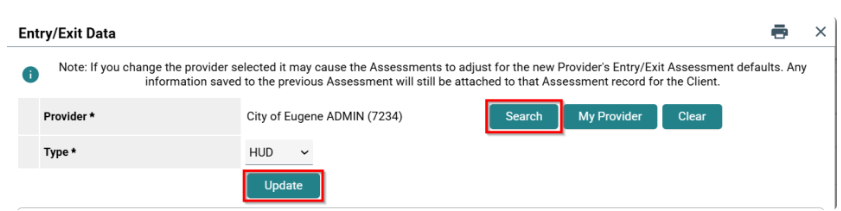
3) Click on Search to find the correct project. After you choose the correct project, click on Update.
4) Scroll to the bottom of the page and click on Save & Exit.
That's it! You are done!
Knee-Slappers
Dogs can't do x-rays. But cats can.
I asked my girlfriend when her birthday was. She said, “March 1st.” So I walked around the room and asked her again.
Was this article helpful?
That’s Great!
Thank you for your feedback
Sorry! We couldn't be helpful
Thank you for your feedback
Feedback sent
We appreciate your effort and will try to fix the article